
-
By admin
-
February 20, 2026
- 0 Comment
LAN Cable vs Ethernet Cable: Definitions, Types, Key Differences
Both are crucial components of modern computer networking. Their job is to enable reliable wired connectivity. However, while managing a home network or setting up a business internet connection, we often hear the terms LAN Cables, Ethernet Cables, and Network Cables. It leaves behind a simple question: which one is the best choice for a reliable, high-performance, and secure digital connectivity?
Things get even more complicated when we see many people using the terms “LAN cable” and “Ethernet cable” interchangeably to mention the same thing (essentially cables that connect a device to the internet).
This article answers all your questions related to LAN and Ethernet cables. It explains the definitions and key differences between a LAN, Ethernet, and Network cable. We will start with the LAN (local area network) and LAN cables first. Our goal will be to understand the essentials of computer networking. Once done, we will take a deep dive into the Ethernet cables.
Are the LAN Cables and Ethernet Cables the Same?
Yes. Though both terms are used frequently while setting up a home or business network, they both mention a cable that connects various devices to the local network (LAN) or the internet. The correct or technical term for such a cable is Ethernet cable.
In general, the LAN stands for Local Area Network. The LAN is a collection of devices, such as printers, computers, and TVs, connected together to communicate or share digital resources quickly and more efficiently. Such a network of physical devices is mostly used in homes, offices, small buildings, and schools.
All devices within this network are connected either using WiFi (wireless connectivity) or Ethernet Cables (wired connectivity). Among them, the wired connectivity provides better performance and a secure connection compared to wireless connectivity (WiFi). As such, many homes, offices, or businesses often prefer Ethernet cables to connect devices and enable internet connection within their area.
Most people, including both the network experts and newbies, are seen using the terms LAN, LAN Cable, or Ethernet Cable interchangeably to mention an Ethernet cable. However, the correct term is simply the Ethernet cable.
What is a LAN (Local Area Network)?
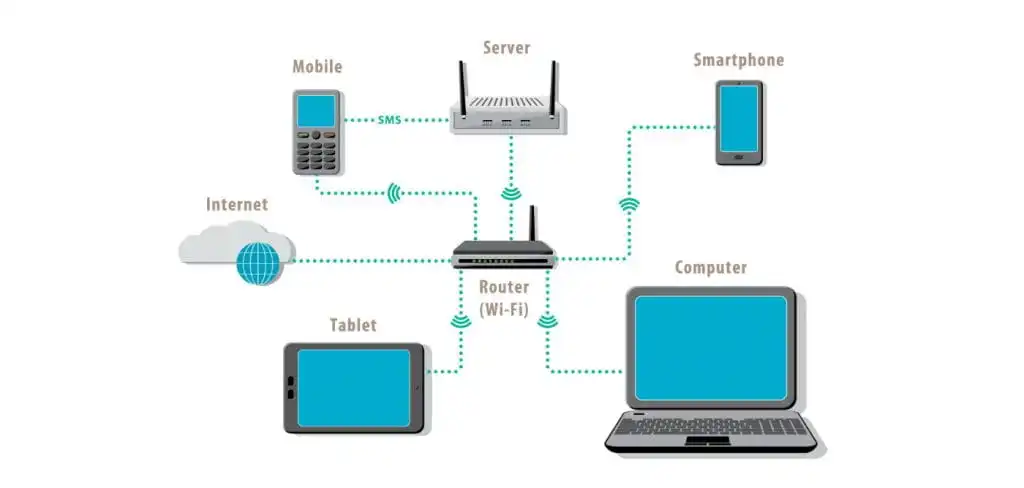
A LAN is a small or large network of physical devices that can communicate with each other or share digital information in any form (files, content, and more). The LAN stands for Local Area Network. It is the foundation of modern digital networks.
The first LAN was developed back in the 1960s to connect computers to other computers. During those days, people couldn’t connect other devices, such as the printer or TV, to the LAN. The Ethernet technology introduced in 1973 changed this scenario and allowed users to connect other devices to the LAN.
Apart from the digital devices, the LAN includes cables, access points, switches, and plenty of other components. An Ethernet cable is one type of cable used in the LAN. We will discuss Ethernet cable in detail in the following sections. To learn more about the LAN overall, please read our article: All About LAN (Local Area Network).
What is a LAN Cable?
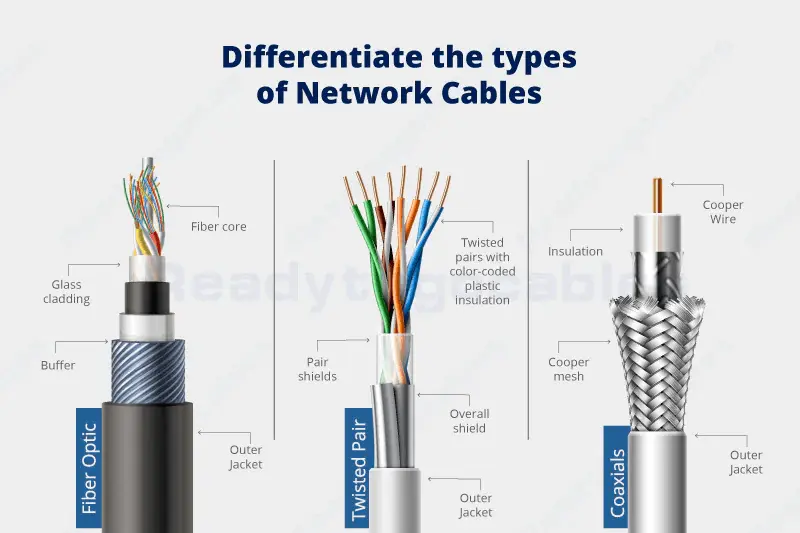
A LAN cable is a medium used to connect multiple devices in a local area. Its job is to enable data transmission and communication between different computers or devices connected to a LAN. There are different types of LAN cables to serve a multitude of functions in modern networking environments—for example, an Ethernet cable and a fibre optic cable.
But when you see a network expert asking for a LAN cable, he is often referring to an Ethernet cable alone. As a result, many of us believe that a LAN cable is an Ethernet cable. In reality, an Ethernet cable is just one type of LAN cable.
Below is the list of the most common cables used in a local network to connect different devices:
- Ethernet Cables: These are the most used LAN cables in the 21st century. They are made up of twisted copper conductors. You can choose different types of Ethernet cables based on your budget, speed, deployment environment, and performance requirements.
- Fibre Optic Cables: Fibre optics is known for its best-in-class performance in long-distance applications. Such cables offer excellent protection against electromagnetic interference and crosstalk. However, they are not as common as Ethernet cables due to precision manufacturing, huge initial investments, and installation complexity.
- Coaxial Cables: These were the popular choices for early LAN standards. In contrast to the Ethernet cables, which include twisted conductors, the conductors in coaxial cable are placed along an axis or simply a line. The coaxial cables have become obsolete over the past decade as the speed needs have dramatically increased.
Patch cables: Short, flexible Ethernet cables used to link nearby devices are known as patch cables. They are also known as the Patch Cord. Such cables play a critical role in the final connection layer of structured local or wide area networks.
What is an Ethernet Cable?
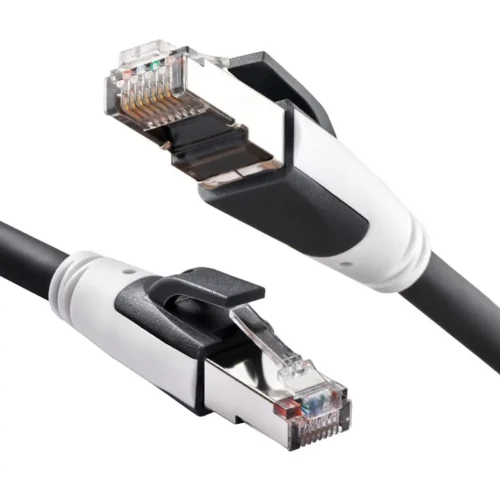
An Ethernet cable connects a device or computer to another device or computer. For example, it is used to connect a computer to a printer or router. The final goal is to create a network of devices that can communicate and share files more quickly and efficiently. Such a network of devices is commonly known as a LAN (local area network).
A typical Ethernet cable consists of 8 individual copper wires. They are arranged into 4 twisted pairs, each of which includes 2 copper wires. The two ends of the Ethernet cable include an RJ45 connector.
The network or internet connections in your home or office heavily depend upon Ethernet cables. There are different types of Ethernet cables, popular as Ethernet categories. The right choice depends upon your speed and distance requirements.
Below is the quick comparison table including all Ethernet cable types or categories from the past to the present.
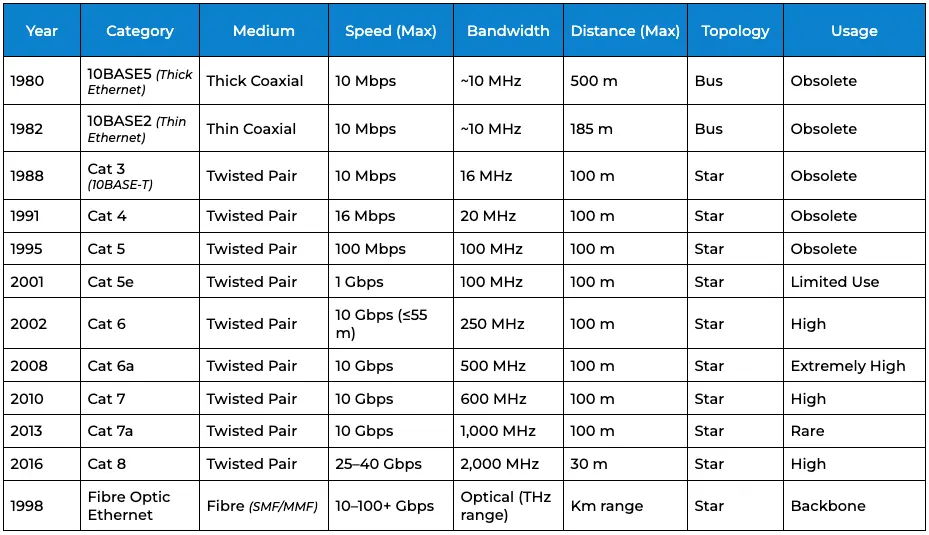
If you are a tech-savvy person always playing around with computers and networks, the Ethernet is probably a term you’ve heard a lot. Now is the time to know that it includes two main components: Ethernet technology and Ethernet cable.
Ethernet Technology
Ethernet is a set of protocols governing the way data is transmitted.
Robert Metcalfe co-founded and implemented Ethernet technology in 1973 while working at Xerox PARC. Its main purpose was to connect the computers to the printers within their lab. The technology quickly gained popularity due to its unmatched reliability, speed, and ease of use.
Ethernet used coaxial cables at the beginning to establish the connection between different devices. However, such cables were quickly replaced with Ethernet cables quickly due to the performance advantages. And, soon, Ethernet cables became the core of this technology.
Key Differences Between LAN Cable and Ethernet Cable
One thing to note is that when people say LAN cable, there are high chance that they are specifically talking about an Ethernet cable. If somebody says just the LAN, then they are referring to the network itself and not just the cable.
To avoid confusion, it is necessary to understand 3 different terminologies:
1. LAN
The LAN is a fundamental concept in the realm of modern networking. It consists of multiple devices. They are connected for quick communication or file sharing. For example, the computer is connected to a printer.
2. LAN Cable
All devices within the LAN (local area network) are connected using cables such as the Ethernet cable, fibre optic cable, and coaxial cable. These cables are technically known as LAN or Network cables.
However, most of the time, people refer to an Ethernet cable when they say a LAN cable. The “LAN”, “LAN Cable”, and “Ethernet Cable” are used interchangeably to mention Ethernet cables only.
FAQs
Q. Is Ethernet or LAN better?
You are referring to two different concepts in computer networking. The Ethernet stands for a technology that enables internet connection through a set of protocols. On the other hand, the LAN (local area network) is a network of devices connected together through Ethernet cables.
The local network can be established through Ethernet cables, fibre optic cables, and coaxial cables. If you are looking for the best among the Ethernet cable and LAN cable, it must be Ethernet cable is a type of LAN cable only. The Ethernet cables remain the best choice as LAN cables.
Q. What Do LAN Cables Do?
There are 3 major types of LAN cables: Ethernet cable, fibre optic cable, and coaxial cable. Each one of them is used to connect two devices together and enable the exchange of data, resources, and information. The most popular choice among them is the Ethernet cable.
Q. Is Networking Cable the Same as Ethernet?
Networking cable is a broader category. It includes mutlitude of cables that connect different devices within a LAN or WAN. An Ethernet cable is a type of Network cable. It is the most popular choice to enable the internet connection between different devices connected to these networks.
Q. Is LAN or Ethernet better for gaming?
The LAN cable and Ethernet cable are both the same. Instead, all Ethernet cables are indeed LAN cables. The LAN cables are a broader category, including Ethernet cables, fibre optic cables, and coaxial cables. The Ethernet cable is considered to be the best choice to establish communication between different devices connected to the LAN or internet. It is known for better connectivity and speeds.
Q. Can I use a LAN cable for Ethernet?
Yes. The terms LAN cable and Ethernet cable are used interchangeably to mention Ethernet cables only. They are both the same.
Q. Does LAN require an Ethernet cable?
Yes, of course. A LAN (local area network) or even modern networks are incomplete without an Ethernet cable. It connects various devices within the network and enables seamless data exchange.
Q. Is WiFi faster than a LAN cable?
No. The WiFi cannot outperform the wired connectivity established through a LAN or Ethernet cable. These cables directly connect different devices to the router for a speedy, consistent connection.
Q. Should I plug my Ethernet into the LAN or the WAN?
Yes. You can plug an Ethernet cable into a LAN or WAN port. It depends on the type of device you wish to communicate with. For example,
If you wish to establish communication between the router and the modem, plug the Ethernet cable into the WAN port of your router.
On the other hand, if you wish to connect your router to a PC, TV, Console, etc., plug the Ethernet cable into the LAN port of your router.
Wider Cable: Leading Manufacturer of Industry-Grade Ethernet Cables
Wider Cable has over 20 years of experience manufacturing and supplying reliable, high-performance Ethernet cables to clients worldwide. We are a top outdoor Ethernet cable manufacturer. We do not just offer off-the-shelf products; our goal is to help clients develop high-performance networking environments.
Our team of experts has helped our clients develop and manage:
- Data Centers
- ISPs and Telecom Networks
- Smart Healthcare Infrastructures
- Highly Reliable Defence Networks
Get In Touch
Our team begins by understanding your technical requirements and application needs. At Wider Cable, our goal is to let clients focus on their core strengths and help them quickly develop advanced systems.
Contact our team of experts today to learn more about our processes and customer testimonials.